Get Drive Letter from Path using PowerShell
Problem
In this blog post, we will show you how to get drive letter from the path using PowerShell.
Using Split-Path Cmdlet
We can use Split-Path cmdlet to get the drive letter by specifying Qualifier parameter. According to the documentation, the qualifier is the drive of the path.
Split-Path -Path 'C:\Scripts\script01.ps1' -Qualifier
The result will look as follows:

Using PSDrive Property
We can also use PSDrive.Name property to get the drive letter.
(Get-Item -Path 'C:\Scripts\script01.ps1').PSDrive.Name
The result will look as follows:

Using Drive property
This property can be used when we want to get drive letter from current path.
(get-location).Drive.Name
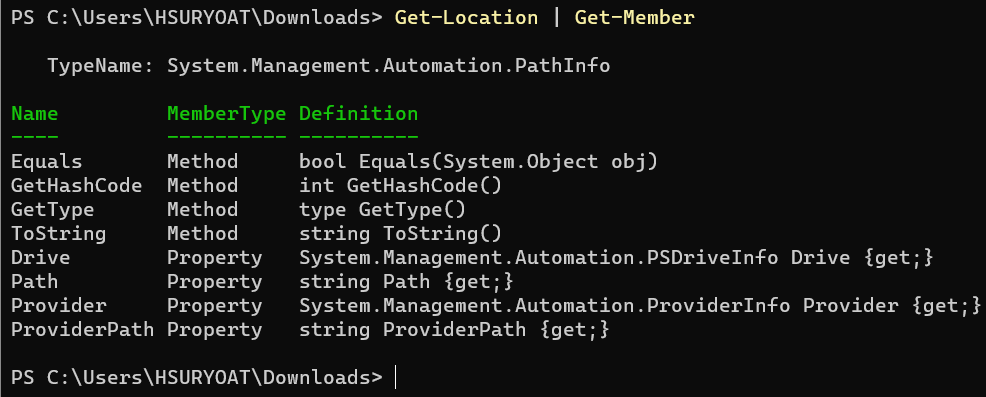
If we inspect the object, we will find that it has Drive property that represents the drive.
Using String Split Function
We can also split the path using String Split function or operator, then get the first character that is supposed to be the drive letter.
(('C:\Scripts\script01.ps1').Split(":")).Get(0)
Below example will get drive letter from current path.
((Get-Location).Path.Split(":")).Get(0)
Using GetPathRoot Method from .NET Framework
We can also use GetPathRoot static method from System.IO.Path class in .NET Framework in order to get the drive. Then, similar to previous solution, we retrieve the first character as the drive letter.
# Specify the path
$path = "C:\Scripts\script01.ps1"

# Use .NET methods to get path root
$root = [System.IO.Path]::GetPathRoot($path)

# The first character should be the drive letter
Write-Host $root[0]
Conclusion
In PowerShell, there are many solutions we can use to get drive letter from the path. First, we can use Split-Path cmdlet and specify Qualifier parameter. Second, we can use PSDrive property of the path item.
The third, for current path we can also use Drive property. Fourth, we can use String Split function. After splitting the path, the first character should be the drive letter.
Lastly, we can also use GetPathRoot method from .NET Framework to get the drive and retrieve the first character as the drive letter.